

Dashboard – Pierwsze kroki.
W poprzednich artykułach poznaliśmy podstawy encji, zanitowaliśmy niezbędne dodatki więc możemy przystąpić do budowania naszego dashbordu. W tym wpisie przedstawię Wam proste trzy „zegary”, które przedstawiają 90% najważniejszych informacji na temat naszej hybrydy. Aby wszystko było wyświetlane prawidłowo konieczne jest zainstalowanie wszystkich dodatków opisanych w tym wpisie.
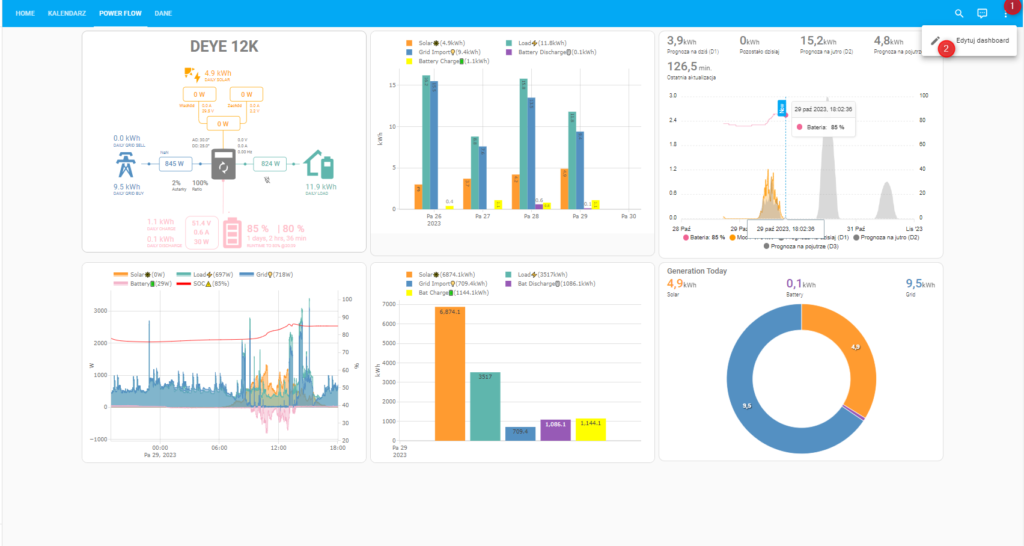
W pierwszej kolejności musimy zmienić konfigurację naszego widoku. W tym celu udajemy się do panelu, klikamy w trzy kropki w prawym górnym rogu (1) następnie w Edytuj Dashboard (2)
Kolejno klikamy w ikonę ołówka przy nazwie daschboard (1). Wpisujemy nazwę (2), wybieramy typ widoku „Vertical (layout-card)” (3) oraz wpisujemy szerokość i max ilość kolumn (4)
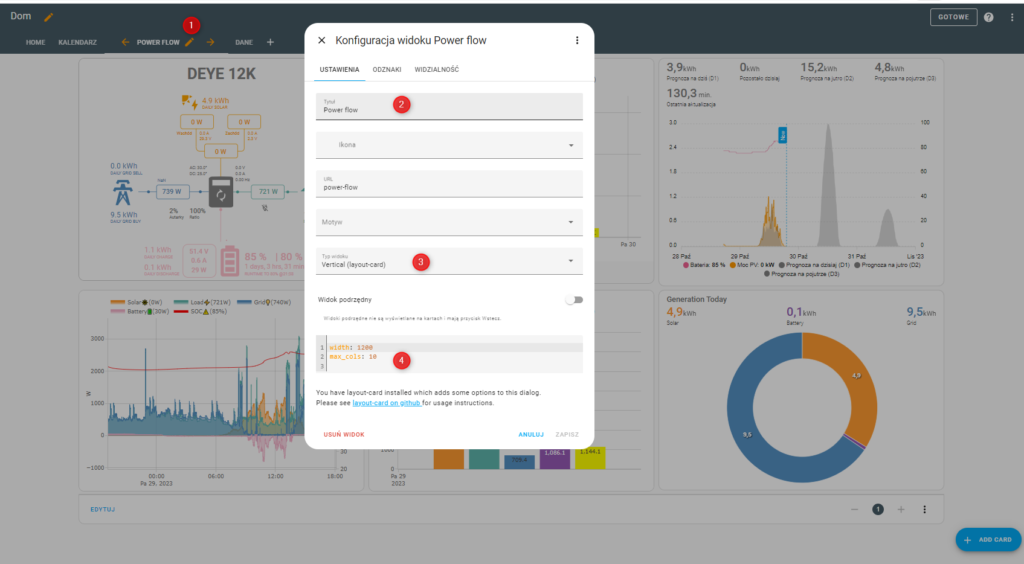
Zapisujemy, możemy przystąpić do budowy naszych zegarów.
Będąc w poprzednio opisanym widoku klikamy na niebieski przycisk opisany Add Card
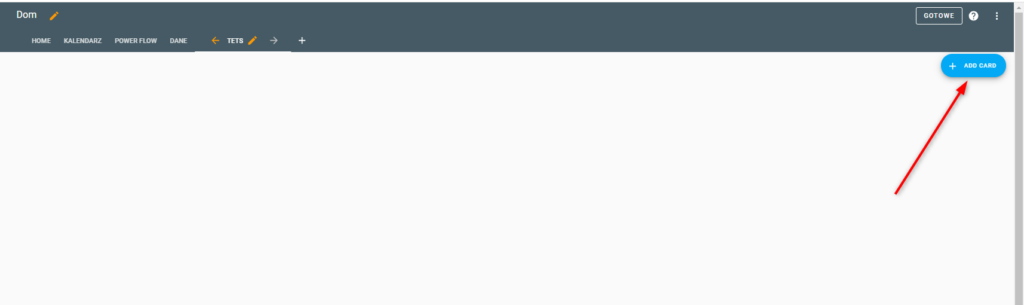
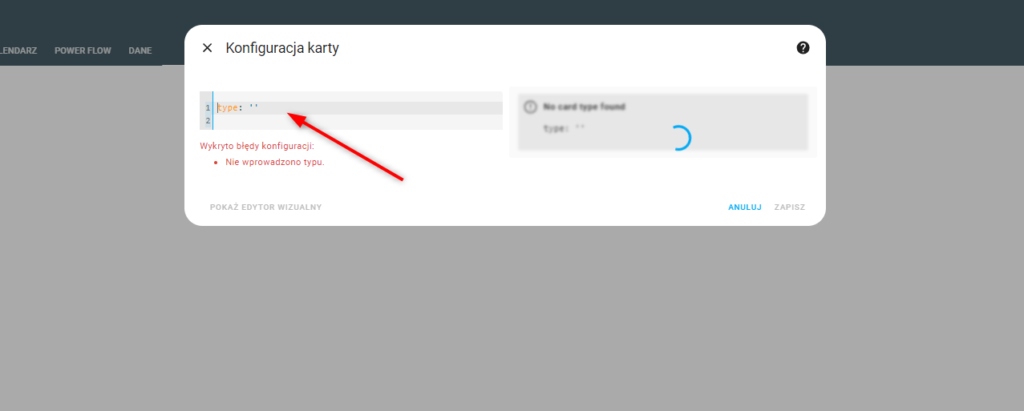
W otwartym oknie przewijamy na sam dół i klikamy w Edytor konfiguracji YAML

Zobaczymy konfigurację karty, w zaznaczonym polu kasujemy wpis i wklejamy kod zamieszczony poniżej.
|
1 2 3 4 5 6 7 8 9 10 11 12 13 14 15 16 17 18 19 20 21 22 23 24 25 26 27 28 29 30 31 32 33 34 35 36 37 38 39 40 41 42 43 44 45 46 47 48 49 50 51 52 53 54 55 56 57 58 59 60 61 62 63 64 65 66 67 68 69 70 71 72 73 74 75 76 77 78 79 80 81 82 83 84 85 86 87 88 89 90 91 92 93 94 95 96 97 98 99 100 101 102 103 104 105 106 107 108 109 110 111 112 113 114 115 116 117 118 119 120 121 122 123 124 125 126 127 128 129 130 131 132 133 134 135 136 137 138 139 140 141 142 143 144 145 146 147 148 149 150 151 152 153 154 155 156 157 158 159 160 161 162 163 164 165 166 167 168 169 170 171 172 173 174 175 176 177 178 179 180 181 182 183 184 185 186 187 188 189 190 191 192 193 194 195 196 197 198 199 200 201 202 203 204 205 206 207 208 209 210 211 212 213 214 215 216 217 218 219 220 221 222 223 224 225 226 227 228 229 230 231 232 233 234 235 236 237 238 239 240 241 242 243 244 245 246 247 248 249 250 251 252 253 254 255 256 257 258 259 260 261 262 263 264 265 266 267 268 269 270 271 272 273 274 275 276 277 278 279 280 281 282 283 284 285 286 287 288 289 290 291 292 293 294 295 296 297 298 299 300 301 302 303 304 305 306 307 308 309 310 311 312 313 314 315 316 317 318 319 320 321 322 323 324 325 326 327 328 329 330 331 332 333 334 335 336 337 338 339 340 341 342 343 344 345 346 347 348 349 350 351 352 353 354 355 356 357 358 359 360 361 362 363 364 365 366 367 368 369 370 371 372 373 374 375 376 377 378 379 380 381 382 383 384 385 386 387 388 389 390 391 392 393 394 395 396 397 398 399 400 401 402 403 404 405 406 407 408 409 410 411 412 413 414 415 416 417 418 419 420 421 422 423 424 425 426 427 428 429 430 431 432 433 434 435 436 437 438 439 440 441 442 443 444 445 446 447 448 449 450 451 452 |
type: horizontal-stack cards: - type: custom:flex-horseshoe-card view_layout: grid-area: g1 entities: - entity: sensor.sunsynk_solar_power decimals: 0 unit: W name: Produkcja PV - entity: sensor.sunsynk_pv1_power decimals: 0 unit: W name: PV1 - entity: sensor.sunsynk_pv2_power decimals: 0 unit: W name: PV2 - entity: sensor.sunsynk_pv1_voltage decimals: 0 unit: V - entity: sensor.sunsynk_pv2_voltage decimals: 0 unit: V - entity: sensor.sunsynk_pv1_current decimals: 1 unit: A - entity: sensor.sunsynk_pv2_current decimals: 1 unit: A - entity: sensor.sunsynk_day_pv_energy decimals: 2 unit: kWh name: Produkcja - entity: sensor.sunsynk_day_pv_energy decimals: 2 unit: kWh name: Docelowo prognoza show: horseshoe_style: autominmax layout: hlines: - id: 0 xpos: 50 ypos: 40 length: 70 styles: - opacity: 0.2; vlines: - id: 0 xpos: 50 ypos: 59 length: 36 styles: - opacity: 0.2; states: - id: 0 entity_index: 0 xpos: 50 ypos: 33 styles: - font-size: 3em; - opacity: 0.9; - id: 1 entity_index: 1 xpos: 47 ypos: 53 styles: - font-size: 1.5em; - text-anchor: end; - id: 2 entity_index: 2 xpos: 53 ypos: 53 styles: - text-anchor: start; - font-size: 1.5em; - id: 3 entity_index: 3 xpos: 46 ypos: 63 styles: - text-anchor: end; - font-size: 1.5em; - id: 4 entity_index: 4 xpos: 53 ypos: 63 styles: - text-anchor: start; - font-size: 1.5em; - id: 5 entity_index: 5 xpos: 46 ypos: 73 styles: - text-anchor: end; - font-size: 1.5em; - id: 6 entity_index: 6 xpos: 53 ypos: 73 styles: - text-anchor: start; - font-size: 1.5em; - id: 7 entity_index: 7 xpos: 0 ypos: 7 styles: - text-anchor: start; - font-size: 1.2em; - id: 8 entity_index: 8 xpos: 75 ypos: 7 styles: - text-anchor: start; - font-size: 1.2em; icons: - id: 0 entity_index: 1 xpos: 1 ypos: 53 align: start size: 1 - id: 1 entity_index: 2 xpos: 53 ypos: 65 align: end size: 0.5 names: - id: 0 entity_index: 0 xpos: 50 ypos: 95 styles: - font-size: 1.2em; - id: 1 entity_index: 1 xpos: 15 ypos: 45 styles: - text-anchor: start; - font-size: 0.5em; - id: 2 entity_index: 2 xpos: 85 ypos: 45 styles: - text-anchor: end; - font-size: 0.5em; - id: 3 entity_index: 7 xpos: 0 ypos: 12 styles: - text-anchor: start; - font-size: 0.5em; - id: 4 entity_index: 8 xpos: 80 ypos: 12 styles: - font-size: 0.5em; - text-anchor: start; horseshoe_scale: min: 0 max: 7000 width: 6 color_stops: '0': orange '2000': orange card_mod: style: | ha-card { --ha-card-background: var(--card-background-color); color: var(--primary-color); } - type: custom:flex-horseshoe-card view_layout: grid-area: g3 entities: - entity: sensor.sunsynk_load_power unit: W name: Zużycie - entity: sensor.sunsynk_grid_voltage_l1 decimals: 0 unit: V - entity: sensor.sunsynk_inverter_frequency decimals: 2 unit: Hz name: Grid - entity: sensor.sunsynk_grid_power decimals: 0 unit: W name: Grid - entity: sensor.sunsynk_day_grid_import decimals: 2 unit: kWh name: Zakup - entity: sensor.sunsynk_day_load_power decimals: 2 unit: kWh name: Zużycie show: horseshoe_style: autominmax layout: hlines: - id: 0 xpos: 50 ypos: 40 length: 70 styles: - opacity: 0.2; - id: 0 xpos: 50 ypos: 60 length: 70 styles: - opacity: 0.2; vlines: - id: 0 xpos: 50 ypos: 50 length: 18 styles: - opacity: 0.2; states: - id: 0 entity_index: 0 xpos: 50 ypos: 33 styles: - font-size: 3em; - opacity: 0.9; - id: 1 entity_index: 1 xpos: 44 ypos: 53 styles: - font-size: 1.5em; - text-anchor: end; - id: 2 entity_index: 2 xpos: 55 ypos: 53 styles: - text-anchor: start; - font-size: 1.5em; - id: 3 entity_index: 3 xpos: 42 ypos: 75 styles: - text-anchor: start; - font-size: 2em; - id: 4 entity_index: 4 xpos: 75 ypos: 7 styles: - text-anchor: start; - font-size: 1.2em; - id: 5 entity_index: 5 xpos: 0 ypos: 7 styles: - text-anchor: start; - font-size: 1.2em; icons: - id: 0 entity_index: 1 xpos: 30 ypos: 52 align: start size: 1 names: - id: 0 entity_index: 0 xpos: 50 ypos: 95 styles: - font-size: 1.2em; - id: 1 entity_index: 4 xpos: 85 ypos: 12 styles: - font-size: 0.5em; - text-anchor: start; - id: 2 entity_index: 5 xpos: 0 ypos: 12 styles: - font-size: 0.5em; - text-anchor: start; - id: 3 entity_index: 3 xpos: 44 ypos: 80 styles: - font-size: 0.5em; - text-anchor: start; horseshoe_scale: min: 0 max: 8000 width: 6 color_stops: '0': '#5fb6ad' '2000': '#5fb6ad' card_mod: style: | ha-card { --ha-card-background: var(--card-background-color); color: var(--primary-color); } - type: custom:flex-horseshoe-card view_layout: grid-area: g2 entities: - entity: sensor.sunsynk_battery_soc decimals: 0 unit: '%' name: BATERIA - entity: sensor.sunsynk_battery_voltage decimals: 2 unit: V - entity: sensor.sunsynk_battery_current decimals: 2 unit: A - entity: sensor.sunsynk_battery_power decimals: 0 unit: W - entity: sensor.sunsynk_day_battery_discharge decimals: 2 unit: kWh name: Rozł. - entity: sensor.sunsynk_day_battery_charge decimals: 2 unit: kWh name: Ład. show: horseshoe_style: autominmax layout: hlines: - id: 0 xpos: 50 ypos: 40 length: 70 styles: - opacity: 0.2; - id: 0 xpos: 50 ypos: 60 length: 70 styles: - opacity: 0.2; vlines: - id: 0 xpos: 50 ypos: 50 length: 18 styles: - opacity: 0.2; states: - id: 0 entity_index: 0 xpos: 50 ypos: 33 styles: - font-size: 3em; - opacity: 0.9; - id: 1 entity_index: 1 xpos: 44 ypos: 53 styles: - font-size: 1.5em; - text-anchor: end; - id: 2 entity_index: 2 xpos: 55 ypos: 53 styles: - text-anchor: start; - font-size: 1.5em; - id: 3 entity_index: 3 xpos: 34 ypos: 75 styles: - text-anchor: start; - font-size: 2em; - id: 4 entity_index: 4 xpos: 76 ypos: 7 styles: - text-anchor: start; - font-size: 1.2em; - id: 5 entity_index: 5 xpos: 0 ypos: 7 styles: - text-anchor: start; - font-size: 1.2em; icons: - id: 0 entity_index: 1 xpos: 30 ypos: 52 align: start size: 1 names: - id: 0 entity_index: 0 xpos: 50 ypos: 95 styles: - font-size: 1.2em; - id: 1 entity_index: 4 xpos: 81 ypos: 12 styles: - font-size: 0.5em; - text-anchor: start; - id: 2 entity_index: 5 xpos: 0 ypos: 12 styles: - font-size: 0.5em; - text-anchor: start; horseshoe_scale: min: 0 max: 100 width: 6 color_stops: '0': pink '2000': pink card_mod: style: | ha-card { --ha-card-background: var(--card-background-color); color: var(--primary-color); } |
Jeżeli wszystkie encje są prawidłowe, po prawej stronie zobaczymy trzy zegary, zapisujemy.
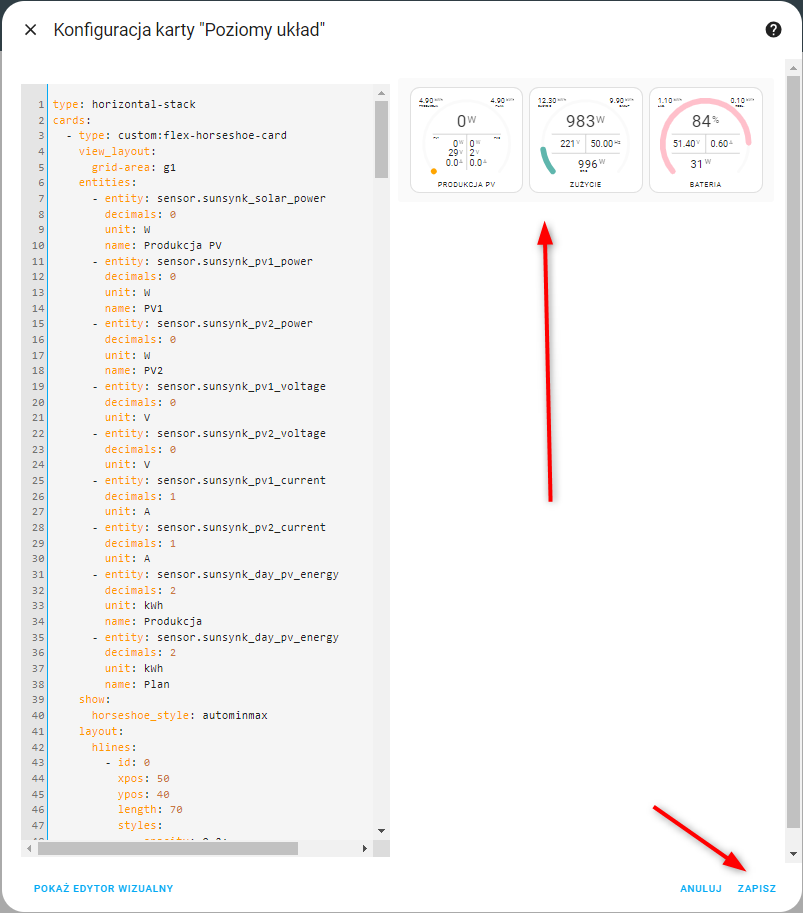
Po zapisaniu zobaczymy widok jak poniżej.
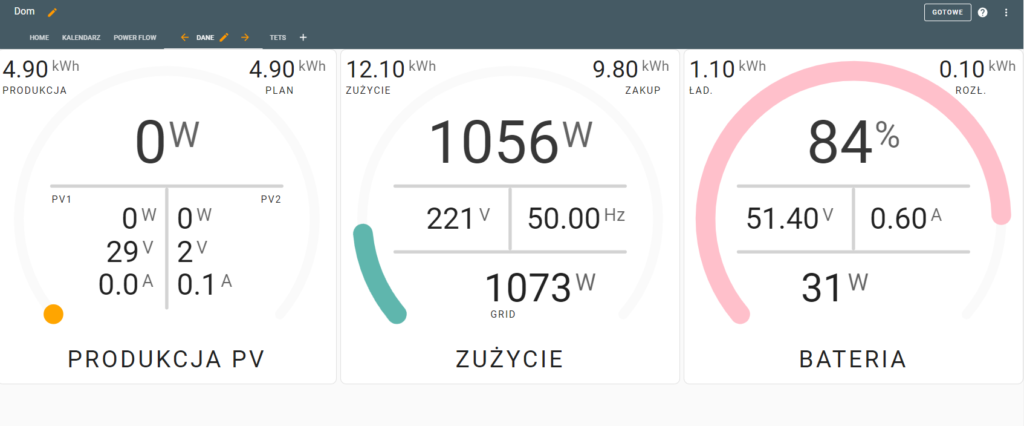
Klikamy w prawym górnym rogu na GOTOWE i cieszymy się widokiem 🙂
Rozwiązywanie problemów z encjami!
Co jeżeli natrafimy na jakieś problemy? Jeden z częściej spotykanych to „Custom element doesn’t exist: flex-horseshoe-car”

Oznacza on, że nie mamy zainstalowanego dodatku „Flexible Horseshoe Card for Lovelace”. Rozwiązaniem jest instalacja brakującego dodatku. Jak to zrobić opisałem w tym wpisie.
Drugim bardzo często spotykanym problemem jest brak lub zła nazwa encji. Zobaczymy komunikat „Cannot read properties of undefined (reading 'state’)„.
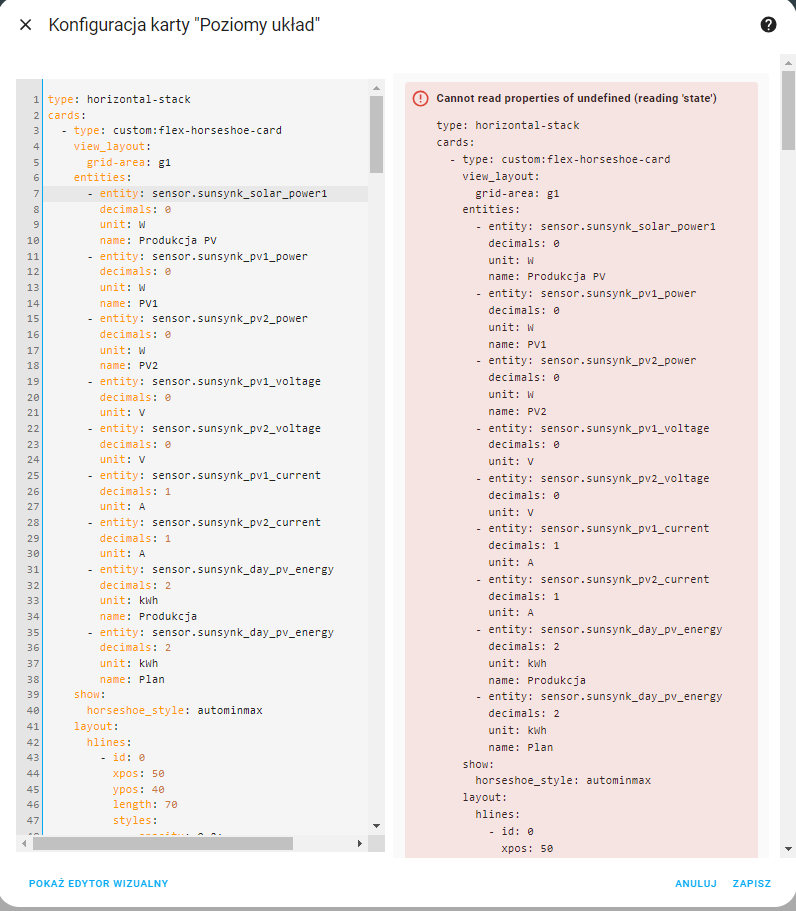
W tym przypadku rozwiązanie nie jest już takie łatwe. Należy sprawdzić wszystkie encje czy są prawidłowo wpisane. Osobiście otwieram sobie drugie okno przeglądarki w którym otwieram rejestr encji Ustawienia=>Urządzenia oraz usługi=>Rejestr encji. Powinniśmy zobaczyć taki widok:
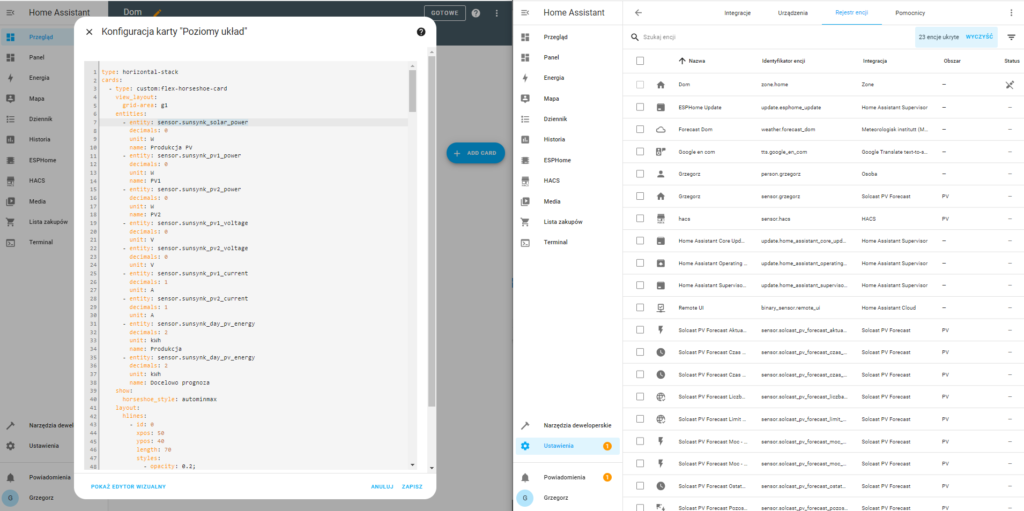
Możemy przejść do weryfikacji, zaznaczamy pierwszą encje (1) wklejamy w pole wyszukiwania w rejestrze encji (2) i sprawdzamy czy taka encja istnieje (3).

Dwa małe byczki w konfiguracji:
– linia 35 kodu jest – entity: sensor.sunsynk_day_pv_energy, powinno być wg mnie: sensor.energy_production_today
– linia 203 kodu sczytuje power a powinno energy
Poza tym bardzo fajnie i łopatologicznie wyjaśnione. Ja czekam na więcej 🙂
Bardzo fajne czytelne, niestety u mnie nie pokazywało energii pobieranej z sieci. W linijce ” grid_power_169: ” wpisałem encję :”sensor.sunsynk_grid_power” natomiast źle pokazuje mi to ile prądu idzie do domu. U mnie całość podłączona do wejścia LOAD. Próbowałem w „inverter_power_175:” dać encję: „sensor.sunsynk_load_power” ale pokazuje zawyżone wartości, tak jakby sumował LOAD z GRID. Ktoś coś podpowie?
Super poradnik, który prowadzi krok po kroku jak stworzyć bardzo czytelny i wszystkomający widok. Bez tej instrukcji nie byłbym w stanie nic podobnego osiągnąć, a tak bez większych problemów się udało dostosować go do mojej instalacji. Super sprawa.
swietne to jest, a jest możliwość żeby pokazywało napięcie z 3 faz?
Tak, proszę sprawdź kod z podstrony dashboard.
W jaki sposób można zainstalować, zaadoptować powyższy dashboard do swojego HA i deye 12kW, nie znalazłem odpowiedzi tutaj. Jaki jest koszt. Bo kawa to mało