
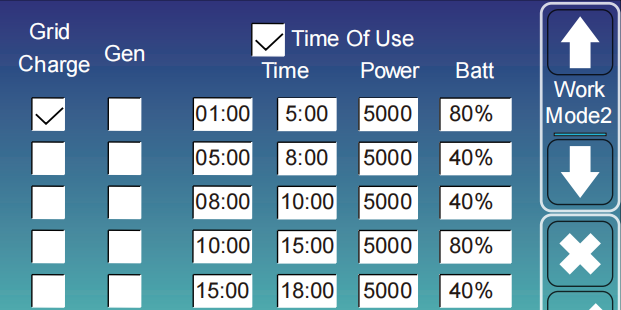
Nowa funkcja! Dodajemy kod od Time Of Use
Szybkie wprowadzenie funkcji „Time of Use” dla falownika hybrydowego Deye
W wielu krajach i regionach cena energii elektrycznej różni się w zależności od okresu czasu, zazwyczaj jest wysoka w godzinach szczytu i niższa w godzinach poza szczytem, co oznacza, że musisz płacić dodatkowe rachunki za energię elektryczną, jeśli Twoje codzienne czynności związane z jej używaniem przypadały w tym samym okresie czasu, co u większości osób.
Aby zmniejszyć rachunki za energię elektryczną naszych klientów, falowniki hybrydowe Deye posiadają 6 okresów czasowych do ładowania/rozładowywania baterii. Oznacza to, że możesz ustawić własny okres czasu, aby ładować baterię, gdy cena energii jest niska, a następnie wykorzystać ją do zasilenia obciążenia, gdy cena wzrośnie.
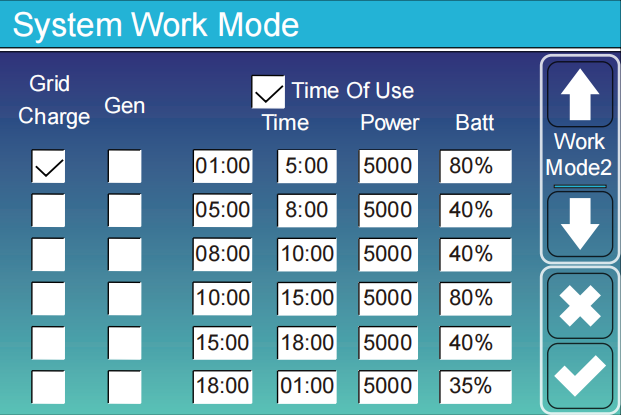
Zaznacz opcję „Time of Use” i wybierz okres czasu, w którym chcesz ładować swoją baterię, a bateria zostanie naładowana w tym czasie.
Na przykład, jak pokazuje poniższy obrazek, zaznaczamy „Ładowanie z sieci” w godzinach od 01:00 do 5:00 i ustawiamy poziom naładowania baterii na 80%. Oznacza to, że w tym okresie czasu, jeśli poziom naładowania baterii będzie niższy niż 80%, falownik będzie używał sieci do ładowania baterii. Kolumna „Gen” odnosi się do generatora diesla; jeśli zaznaczysz tę kolumnę, falownik będzie korzystał z generatora zamiast sieci do ładowania baterii.
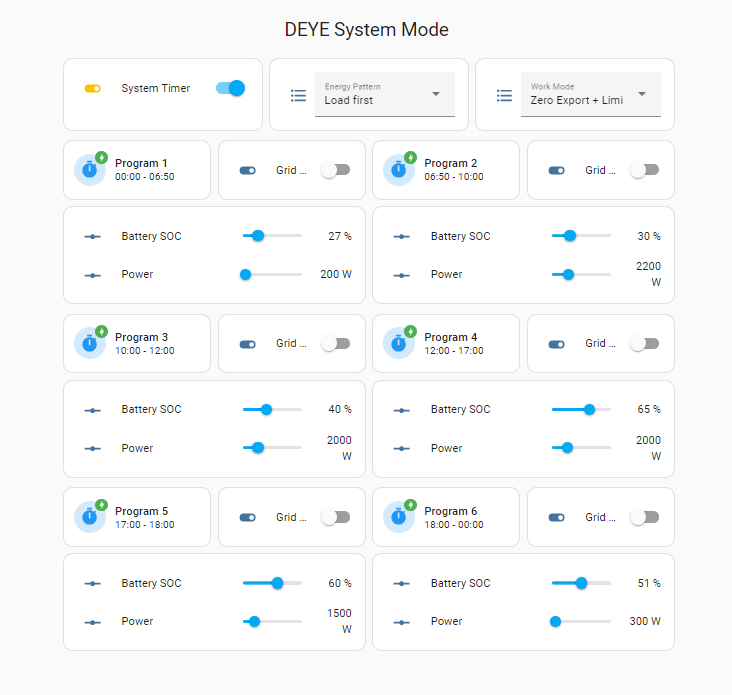
Poniżej zamieszczam przykładowe kody do Home Assistant.
Falowniki 3 f – SOC
|
1 2 3 4 5 6 7 8 9 10 11 12 13 14 15 16 17 18 19 20 21 22 23 24 25 26 27 28 29 30 31 32 33 34 35 36 37 38 39 40 41 42 43 44 45 46 47 48 49 50 51 52 53 54 55 56 57 58 59 60 61 62 63 64 65 66 67 68 69 70 71 72 73 74 75 76 77 78 79 80 81 82 83 84 85 86 87 88 89 90 91 92 93 94 95 96 97 98 99 100 101 102 103 104 105 106 107 108 109 110 111 112 113 114 115 116 117 118 119 120 121 122 123 124 125 126 127 128 129 130 131 132 133 134 135 136 137 138 139 140 141 142 143 144 145 146 147 148 149 150 151 152 153 154 155 156 157 158 159 160 161 162 163 164 165 166 167 168 169 170 171 172 173 174 175 176 177 178 179 180 181 182 183 184 185 186 187 188 189 190 191 192 193 194 195 196 197 198 199 200 201 202 203 204 205 206 207 208 209 210 211 212 213 214 215 216 217 218 219 220 221 222 223 224 225 226 227 228 229 230 231 232 233 234 235 236 237 238 239 240 241 242 243 244 245 246 247 248 249 250 251 252 |
type: custom:layout-card layout_type: custom:grid-layout cards: - type: custom:mushroom-title-card title: DEYE System Mode alignment: center view_layout: grid-area: header - type: horizontal-stack cards: - type: entities entities: - entity: switch.sunsynk_toggle_system_timer name: System Timer state_color: true - type: entities entities: - entity: select.sunsynk_energy_pattern name: Energy Pattern state_color: true - type: entities entities: - entity: select.sunsynk_work_mode name: Work Mode state_color: true view_layout: grid-area: system - type: vertical-stack cards: - type: horizontal-stack cards: - type: custom:mushroom-template-card primary: Program 1 secondary: >- {{ states("sensor.sunsynk_time_slot_1") }} - {{ states("sensor.sunsynk_time_slot_2") }} icon: mdi:timer multiline_secondary: false badge_icon: mdi:lightning-bolt icon_color: blue badge_color: green fill_container: true - type: entities entities: - entity: switch.sunsynk_system_mode_grid_charge_time1 name: Grid Charge state_color: true - type: entities entities: - type: custom:slider-entity-row entity: number.sunsynk_system_mode_soc_time1 name: Battery SOC hide_state: false grow: true - type: custom:slider-entity-row entity: number.sunsynk_system_mode_power_time1 name: Power hide_state: false grow: true view_layout: grid-area: prog1 - type: vertical-stack cards: - type: horizontal-stack cards: - type: custom:mushroom-template-card primary: Program 2 secondary: >- {{ states("sensor.sunsynk_time_slot_2") }} - {{ states("sensor.sunsynk_time_slot_3") }} icon: mdi:timer multiline_secondary: false badge_icon: mdi:lightning-bolt icon_color: blue badge_color: green fill_container: true - type: entities entities: - entity: switch.sunsynk_system_mode_grid_charge_time2 name: Grid Charge state_color: true - type: entities entities: - type: custom:slider-entity-row entity: number.sunsynk_system_mode_soc_time2 name: Battery SOC hide_state: false grow: true - type: custom:slider-entity-row entity: number.sunsynk_system_mode_power_time2 name: Power hide_state: false grow: true view_layout: grid-area: prog2 - type: vertical-stack cards: - type: horizontal-stack cards: - type: custom:mushroom-template-card primary: Program 3 secondary: >- {{ states("sensor.sunsynk_time_slot_3") }} - {{ states("sensor.sunsynk_time_slot_4") }} icon: mdi:timer multiline_secondary: false badge_icon: mdi:lightning-bolt icon_color: blue badge_color: green fill_container: true - type: entities entities: - entity: switch.sunsynk_system_mode_grid_charge_time3 name: Grid Charge state_color: true - type: entities entities: - type: custom:slider-entity-row entity: number.sunsynk_system_mode_soc_time3 name: Battery SOC hide_state: false grow: true - type: custom:slider-entity-row entity: number.sunsynk_system_mode_power_time3 name: Power hide_state: false grow: true view_layout: grid-area: prog3 - type: vertical-stack cards: - type: horizontal-stack cards: - type: custom:mushroom-template-card primary: Program 4 secondary: >- {{ states("sensor.sunsynk_time_slot_4") }} - {{ states("sensor.sunsynk_time_slot_5") }} icon: mdi:timer multiline_secondary: false badge_icon: mdi:lightning-bolt icon_color: blue badge_color: green fill_container: true - type: entities entities: - entity: switch.sunsynk_system_mode_grid_charge_time4 name: Grid Charge state_color: true - type: entities entities: - type: custom:slider-entity-row entity: number.sunsynk_system_mode_soc_time4 name: Battery SOC hide_state: false grow: true - type: custom:slider-entity-row entity: number.sunsynk_system_mode_power_time4 name: Power hide_state: false grow: true view_layout: grid-area: prog4 - type: vertical-stack cards: - type: horizontal-stack cards: - type: custom:mushroom-template-card primary: Program 5 secondary: >- {{ states("sensor.sunsynk_time_slot_5") }} - {{ states("sensor.sunsynk_time_slot_6") }} icon: mdi:timer multiline_secondary: false badge_icon: mdi:lightning-bolt icon_color: blue badge_color: green fill_container: true - type: entities entities: - entity: switch.sunsynk_system_mode_grid_charge_time5 name: Grid Charge state_color: true - type: entities entities: - type: custom:slider-entity-row entity: number.sunsynk_system_mode_soc_time5 name: Battery SOC hide_state: false grow: true - type: custom:slider-entity-row entity: number.sunsynk_system_mode_power_time5 name: Power hide_state: false grow: true view_layout: grid-area: prog5 - type: vertical-stack cards: - type: horizontal-stack cards: - type: custom:mushroom-template-card primary: Program 6 secondary: >- {{ states("sensor.sunsynk_time_slot_6") }} - {{ states("sensor.sunsynk_time_slot_1") }} icon: mdi:timer multiline_secondary: false badge_icon: mdi:lightning-bolt icon_color: blue badge_color: green fill_container: true - type: entities entities: - entity: switch.sunsynk_system_mode_grid_charge_time6 name: Grid Charge state_color: true - type: entities entities: - type: custom:slider-entity-row entity: number.sunsynk_system_mode_soc_time6 name: Battery SOC hide_state: false grow: true - type: custom:slider-entity-row entity: number.sunsynk_system_mode_power_time6 name: Power hide_state: false grow: true view_layout: grid-area: prog6 layout: grid-template-columns: 2fr 2fr 2fr 2fr grid-template-rows: auto grid-template-areas: | ". header header ." ". system system ." ". prog1 prog2 ." ". prog3 prog4 ." ". prog5 prog6 ." mediaquery: '(max-width: 800px)': grid-template-columns: auto grid-template-areas: | "header" "system" "prog1" "prog2" "prog3" "prog4" "prog5" "prog6" |
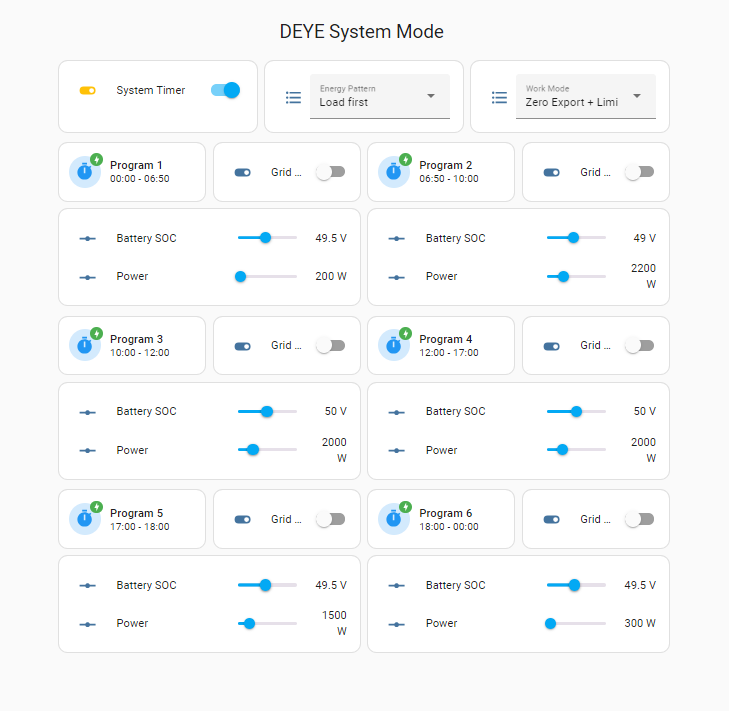
Falowniki 3 f – Napięcie
|
1 2 3 4 5 6 7 8 9 10 11 12 13 14 15 16 17 18 19 20 21 22 23 24 25 26 27 28 29 30 31 32 33 34 35 36 37 38 39 40 41 42 43 44 45 46 47 48 49 50 51 52 53 54 55 56 57 58 59 60 61 62 63 64 65 66 67 68 69 70 71 72 73 74 75 76 77 78 79 80 81 82 83 84 85 86 87 88 89 90 91 92 93 94 95 96 97 98 99 100 101 102 103 104 105 106 107 108 109 110 111 112 113 114 115 116 117 118 119 120 121 122 123 124 125 126 127 128 129 130 131 132 133 134 135 136 137 138 139 140 141 142 143 144 145 146 147 148 149 150 151 152 153 154 155 156 157 158 159 160 161 162 163 164 165 166 167 168 169 170 171 172 173 174 175 176 177 178 179 180 181 182 183 184 185 186 187 188 189 190 191 192 193 194 195 196 197 198 199 200 201 202 203 204 205 206 207 208 209 210 211 212 213 214 215 216 217 218 219 220 221 222 223 224 225 226 227 228 229 230 231 232 233 234 235 236 237 238 239 240 241 242 243 244 245 246 247 248 249 250 251 252 |
type: custom:layout-card layout_type: custom:grid-layout cards: - type: custom:mushroom-title-card title: DEYE System Mode alignment: center view_layout: grid-area: header - type: horizontal-stack cards: - type: entities entities: - entity: switch.sunsynk_toggle_system_timer name: System Timer state_color: true - type: entities entities: - entity: select.sunsynk_energy_pattern name: Energy Pattern state_color: true - type: entities entities: - entity: select.sunsynk_work_mode name: Work Mode state_color: true view_layout: grid-area: system - type: vertical-stack cards: - type: horizontal-stack cards: - type: custom:mushroom-template-card primary: Program 1 secondary: >- {{ states("sensor.sunsynk_time_slot_1") }} - {{ states("sensor.sunsynk_time_slot_2") }} icon: mdi:timer multiline_secondary: false badge_icon: mdi:lightning-bolt icon_color: blue badge_color: green fill_container: true - type: entities entities: - entity: switch.sunsynk_system_mode_grid_charge_time1 name: Grid Charge state_color: true - type: entities entities: - type: custom:slider-entity-row entity: number.sunsynk_system_mode_v_time1 name: Battery SOC hide_state: false grow: true - type: custom:slider-entity-row entity: number.sunsynk_system_mode_power_time1 name: Power hide_state: false grow: true view_layout: grid-area: prog1 - type: vertical-stack cards: - type: horizontal-stack cards: - type: custom:mushroom-template-card primary: Program 2 secondary: >- {{ states("sensor.sunsynk_time_slot_2") }} - {{ states("sensor.sunsynk_time_slot_3") }} icon: mdi:timer multiline_secondary: false badge_icon: mdi:lightning-bolt icon_color: blue badge_color: green fill_container: true - type: entities entities: - entity: switch.sunsynk_system_mode_grid_charge_time2 name: Grid Charge state_color: true - type: entities entities: - type: custom:slider-entity-row entity: number.sunsynk_system_mode_v_time2 name: Battery SOC hide_state: false grow: true - type: custom:slider-entity-row entity: number.sunsynk_system_mode_power_time2 name: Power hide_state: false grow: true view_layout: grid-area: prog2 - type: vertical-stack cards: - type: horizontal-stack cards: - type: custom:mushroom-template-card primary: Program 3 secondary: >- {{ states("sensor.sunsynk_time_slot_3") }} - {{ states("sensor.sunsynk_time_slot_4") }} icon: mdi:timer multiline_secondary: false badge_icon: mdi:lightning-bolt icon_color: blue badge_color: green fill_container: true - type: entities entities: - entity: switch.sunsynk_system_mode_grid_charge_time3 name: Grid Charge state_color: true - type: entities entities: - type: custom:slider-entity-row entity: number.sunsynk_system_mode_v_time3 name: Battery SOC hide_state: false grow: true - type: custom:slider-entity-row entity: number.sunsynk_system_mode_power_time3 name: Power hide_state: false grow: true view_layout: grid-area: prog3 - type: vertical-stack cards: - type: horizontal-stack cards: - type: custom:mushroom-template-card primary: Program 4 secondary: >- {{ states("sensor.sunsynk_time_slot_4") }} - {{ states("sensor.sunsynk_time_slot_5") }} icon: mdi:timer multiline_secondary: false badge_icon: mdi:lightning-bolt icon_color: blue badge_color: green fill_container: true - type: entities entities: - entity: switch.sunsynk_system_mode_grid_charge_time4 name: Grid Charge state_color: true - type: entities entities: - type: custom:slider-entity-row entity: number.sunsynk_system_mode_v_time4 name: Battery SOC hide_state: false grow: true - type: custom:slider-entity-row entity: number.sunsynk_system_mode_power_time4 name: Power hide_state: false grow: true view_layout: grid-area: prog4 - type: vertical-stack cards: - type: horizontal-stack cards: - type: custom:mushroom-template-card primary: Program 5 secondary: >- {{ states("sensor.sunsynk_time_slot_5") }} - {{ states("sensor.sunsynk_time_slot_6") }} icon: mdi:timer multiline_secondary: false badge_icon: mdi:lightning-bolt icon_color: blue badge_color: green fill_container: true - type: entities entities: - entity: switch.sunsynk_system_mode_grid_charge_time5 name: Grid Charge state_color: true - type: entities entities: - type: custom:slider-entity-row entity: number.sunsynk_system_mode_v_time5 name: Battery SOC hide_state: false grow: true - type: custom:slider-entity-row entity: number.sunsynk_system_mode_power_time5 name: Power hide_state: false grow: true view_layout: grid-area: prog5 - type: vertical-stack cards: - type: horizontal-stack cards: - type: custom:mushroom-template-card primary: Program 6 secondary: >- {{ states("sensor.sunsynk_time_slot_6") }} - {{ states("sensor.sunsynk_time_slot_1") }} icon: mdi:timer multiline_secondary: false badge_icon: mdi:lightning-bolt icon_color: blue badge_color: green fill_container: true - type: entities entities: - entity: switch.sunsynk_system_mode_grid_charge_time6 name: Grid Charge state_color: true - type: entities entities: - type: custom:slider-entity-row entity: number.sunsynk_system_mode_v_time6 name: Battery SOC hide_state: false grow: true - type: custom:slider-entity-row entity: number.sunsynk_system_mode_power_time6 name: Power hide_state: false grow: true view_layout: grid-area: prog6 layout: grid-template-columns: 2fr 2fr 2fr 2fr grid-template-rows: auto grid-template-areas: | ". header header ." ". system system ." ". prog1 prog2 ." ". prog3 prog4 ." ". prog5 prog6 ." mediaquery: '(max-width: 800px)': grid-template-columns: auto grid-template-areas: | "header" "system" "prog1" "prog2" "prog3" "prog4" "prog5" "prog6" |
Falowniki 1f – SOC
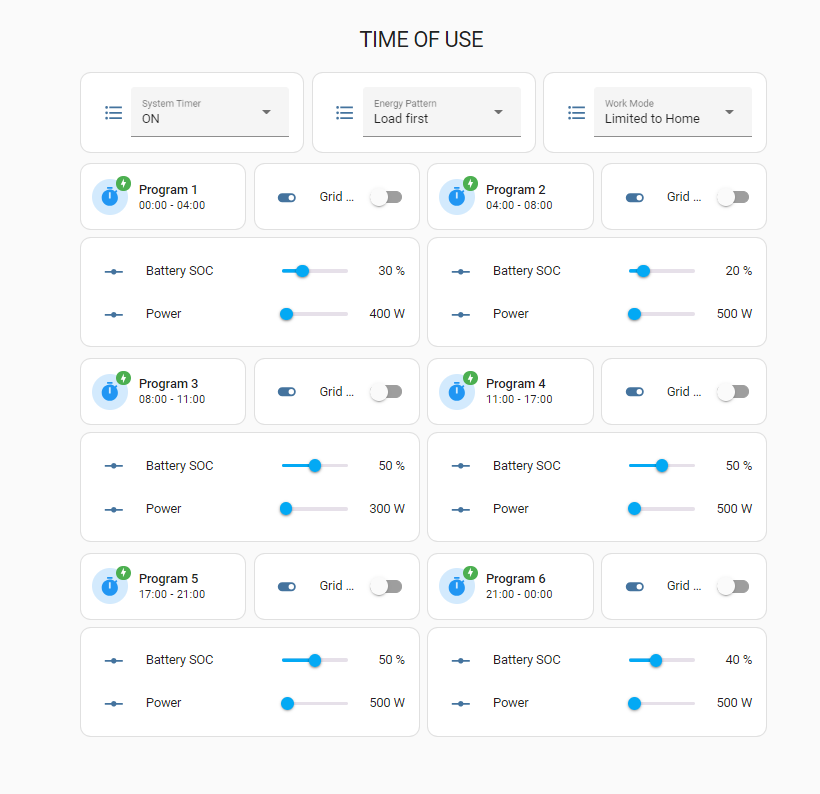
|
1 2 3 4 5 6 7 8 9 10 11 12 13 14 15 16 17 18 19 20 21 22 23 24 25 26 27 28 29 30 31 32 33 34 35 36 37 38 39 40 41 42 43 44 45 46 47 48 49 50 51 52 53 54 55 56 57 58 59 60 61 62 63 64 65 66 67 68 69 70 71 72 73 74 75 76 77 78 79 80 81 82 83 84 85 86 87 88 89 90 91 92 93 94 95 96 97 98 99 100 101 102 103 104 105 106 107 108 109 110 111 112 113 114 115 116 117 118 119 120 121 122 123 124 125 126 127 128 129 130 131 132 133 134 135 136 137 138 139 140 141 142 143 144 145 146 147 148 149 150 151 152 153 154 155 156 157 158 159 160 161 162 163 164 165 166 167 168 169 170 171 172 173 174 175 176 177 178 179 180 181 182 183 184 185 186 187 188 189 190 191 192 193 194 195 196 197 198 199 200 201 202 203 204 205 206 207 208 209 210 211 212 213 214 215 216 217 218 219 220 221 222 223 224 225 226 227 228 229 230 231 232 233 234 235 236 237 238 239 240 241 242 243 244 245 246 247 248 249 250 251 252 |
type: custom:layout-card layout_type: custom:grid-layout cards: - type: custom:mushroom-title-card title: TIME OF USE alignment: center view_layout: grid-area: header - type: horizontal-stack cards: - type: entities entities: - entity: select.sunsynk_time_of_use_off_on name: System Timer state_color: true - type: entities entities: - entity: select.sunsynk_energy_pattern name: Energy Pattern state_color: true - type: entities entities: - entity: select.sunsynk_work_mode name: Work Mode state_color: true view_layout: grid-area: system - type: vertical-stack cards: - type: horizontal-stack cards: - type: custom:mushroom-template-card primary: Program 1 secondary: >- {{ states("sensor.sunsynk_time_slot_1") }} - {{ states("sensor.sunsynk_time_slot_2") }} icon: mdi:timer multiline_secondary: false badge_icon: mdi:lightning-bolt icon_color: blue badge_color: green fill_container: true - type: entities entities: - entity: switch.sunsynk_system_mode_grid_charge_time1 name: Grid Charge state_color: true - type: entities entities: - type: custom:slider-entity-row entity: number.sunsynk_system_mode_soc_time1 name: Battery SOC hide_state: false grow: true - type: custom:slider-entity-row entity: number.sunsynk_system_mode_power_time1 name: Power hide_state: false grow: true view_layout: grid-area: prog1 - type: vertical-stack cards: - type: horizontal-stack cards: - type: custom:mushroom-template-card primary: Program 2 secondary: >- {{ states("sensor.sunsynk_time_slot_2") }} - {{ states("sensor.sunsynk_time_slot_3") }} icon: mdi:timer multiline_secondary: false badge_icon: mdi:lightning-bolt icon_color: blue badge_color: green fill_container: true - type: entities entities: - entity: switch.sunsynk_system_mode_grid_charge_time2 name: Grid Charge state_color: true - type: entities entities: - type: custom:slider-entity-row entity: number.sunsynk_system_mode_soc_time2 name: Battery SOC hide_state: false grow: true - type: custom:slider-entity-row entity: number.sunsynk_system_mode_power_time2 name: Power hide_state: false grow: true view_layout: grid-area: prog2 - type: vertical-stack cards: - type: horizontal-stack cards: - type: custom:mushroom-template-card primary: Program 3 secondary: >- {{ states("sensor.sunsynk_time_slot_3") }} - {{ states("sensor.sunsynk_time_slot_4") }} icon: mdi:timer multiline_secondary: false badge_icon: mdi:lightning-bolt icon_color: blue badge_color: green fill_container: true - type: entities entities: - entity: switch.sunsynk_system_mode_grid_charge_time3 name: Grid Charge state_color: true - type: entities entities: - type: custom:slider-entity-row entity: number.sunsynk_system_mode_soc_time3 name: Battery SOC hide_state: false grow: true - type: custom:slider-entity-row entity: number.sunsynk_system_mode_power_time3 name: Power hide_state: false grow: true view_layout: grid-area: prog3 - type: vertical-stack cards: - type: horizontal-stack cards: - type: custom:mushroom-template-card primary: Program 4 secondary: >- {{ states("sensor.sunsynk_time_slot_4") }} - {{ states("sensor.sunsynk_time_slot_5") }} icon: mdi:timer multiline_secondary: false badge_icon: mdi:lightning-bolt icon_color: blue badge_color: green fill_container: true - type: entities entities: - entity: switch.sunsynk_system_mode_grid_charge_time4 name: Grid Charge state_color: true - type: entities entities: - type: custom:slider-entity-row entity: number.sunsynk_system_mode_soc_time4 name: Battery SOC hide_state: false grow: true - type: custom:slider-entity-row entity: number.sunsynk_system_mode_power_time4 name: Power hide_state: false grow: true view_layout: grid-area: prog4 - type: vertical-stack cards: - type: horizontal-stack cards: - type: custom:mushroom-template-card primary: Program 5 secondary: >- {{ states("sensor.sunsynk_time_slot_5") }} - {{ states("sensor.sunsynk_time_slot_6") }} icon: mdi:timer multiline_secondary: false badge_icon: mdi:lightning-bolt icon_color: blue badge_color: green fill_container: true - type: entities entities: - entity: switch.sunsynk_system_mode_grid_charge_time5 name: Grid Charge state_color: true - type: entities entities: - type: custom:slider-entity-row entity: number.sunsynk_system_mode_soc_time5 name: Battery SOC hide_state: false grow: true - type: custom:slider-entity-row entity: number.sunsynk_system_mode_power_time5 name: Power hide_state: false grow: true view_layout: grid-area: prog5 - type: vertical-stack cards: - type: horizontal-stack cards: - type: custom:mushroom-template-card primary: Program 6 secondary: >- {{ states("sensor.sunsynk_time_slot_6") }} - {{ states("sensor.sunsynk_time_slot_1") }} icon: mdi:timer multiline_secondary: false badge_icon: mdi:lightning-bolt icon_color: blue badge_color: green fill_container: true - type: entities entities: - entity: switch.sunsynk_system_mode_grid_charge_time6 name: Grid Charge state_color: true - type: entities entities: - type: custom:slider-entity-row entity: number.sunsynk_system_mode_soc_time6 name: Battery SOC hide_state: false grow: true - type: custom:slider-entity-row entity: number.sunsynk_system_mode_power_time6 name: Power hide_state: false grow: true view_layout: grid-area: prog6 layout: grid-template-columns: 2fr 2fr 2fr 2fr grid-template-rows: auto grid-template-areas: | ". header header ." ". system system ." ". prog1 prog2 ." ". prog3 prog4 ." ". prog5 prog6 ." mediaquery: '(max-width: 800px)': grid-template-columns: auto grid-template-areas: | "header" "system" "prog1" "prog2" "prog3" "prog4" "prog5" "prog6" |
Logika Deye jest troche pokręcona.
Ustawienie „Grid Charge” występuje w dwóch miejscach
– na ekranie „Battery Setings” nazwijmy ją „A”
– na podekranie „System Work Mode” nazwijmy ją „B”
I teraz logika
– jeśli „A” jest załączona – falownik bedzie ladować batt z GRIDU oraz PV zgodnie z ustawieniami na ekranie „System Work Mode” (jesli zaznaczymy tam opcje „B” to falownik moze ladowac batt z GRIDU oraz PV)
– jeśli „A” jest niezaznaczona to falownik bedzie ladowac batt TYLKO Z PV zgodnie z ustawieniami na ekranie „System Work Mode” (adekwatnie jesli opcja „B” będzie tam zaznaczona to falownik moze ladowac batt TYLKO Z PV)
Deye ma jeszcze jeden ficzer. Jeśli tryb pracy zmienimy na „Selling First” falownik będzie wysyłał do sieci produkcję z PV. Ale jeśli na ekranie „System Work Mode” zaznaczymy grid to do sieci pośle też energię z baterii.
cześć. Czym się rózni falownik 3f SOC od wersji falownik 3f Napięcie?
Działa tylko przy połączeniu po modbus? czy po Solarman Stick Logger da się?
https://www.youtube.com/watch?v=X_ypBi7iuJc&list=PLnJxPujxyV-Tzrm0mrhX8U6BRJGsqHMad&index=4
W tym po MQTT działa niby przez standardowy loger 😀 – nie testowalem – zbieram info przed zakupem i konfiguracja
Zmodyfikowany dashboard zawiera teraz możliwość wyboru godziny programu oraz natężeń: ładowania, rozładowywania i sieci z poziomu dashboardu
type: custom:layout-card
layout_type: custom:grid-layout
cards:
– type: custom:mushroom-title-card
title: DEYE System Mode
alignment: center
view_layout:
grid-area: header
– type: horizontal-stack
cards:
– type: entities
entities:
– entity: switch.sunsynk_toggle_system_timer
name: System Timer
state_color: true
– type: entities
entities:
– entity: select.sunsynk_energy_pattern
name: Energy Pattern
state_color: true
– type: entities
entities:
– entity: select.sunsynk_work_mode
name: Work Mode
state_color: true
view_layout:
grid-area: system
– type: vertical-stack
cards:
– type: custom:mushroom-title-card
title: Current Settings
alignment: center
– type: horizontal-stack
cards:
– type: entities
entities:
– type: custom:slider-entity-row
entity: number.sunsynk_battery_max_charge_current
name: Max Charge
min: 0
max: 240
step: 5
hide_state: false
grow: true
– type: entities
entities:
– type: custom:slider-entity-row
entity: number.sunsynk_battery_max_discharge_current
name: Max Discharge
min: 0
max: 240
step: 5
hide_state: false
grow: true
– type: entities
entities:
– type: custom:slider-entity-row
entity: number.sunsynk_grid_charge_battery_current
name: Grid Charge
min: 0
max: 240
step: 5
hide_state: false
grow: true
view_layout:
grid-area: current
– type: vertical-stack
cards:
– type: horizontal-stack
cards:
– type: custom:mushroom-template-card
primary: Program 1
secondary: >-
{{ states(„sensor.sunsynk_time_slot_1”) }} – {{
states(„sensor.sunsynk_time_slot_2”) }}
icon: mdi:timer
multiline_secondary: false
badge_icon: mdi:lightning-bolt
icon_color: blue
badge_color: green
fill_container: true
– type: entities
entities:
– entity: switch.sunsynk_system_mode_grid_charge_time1
name: Grid Charge
state_color: true
– type: entities
entities:
– type: custom:slider-entity-row
entity: number.sunsynk_system_mode_soc_time1
name: Battery SOC
hide_state: false
grow: true
– type: custom:slider-entity-row
entity: number.sunsynk_system_mode_power_time1
name: Power
step: 500
hide_state: false
grow: true
– type: custom:slider-entity-row
entity: number.sunsynk_system_mode_time1
name: Time
min: 0
max: 2400
step: 100
hide_state: false
grow: true
view_layout:
grid-area: prog1
– type: vertical-stack
cards:
– type: horizontal-stack
cards:
– type: custom:mushroom-template-card
primary: Program 2
secondary: >-
{{ states(„sensor.sunsynk_time_slot_2”) }} – {{
states(„sensor.sunsynk_time_slot_3”) }}
icon: mdi:timer
multiline_secondary: false
badge_icon: mdi:lightning-bolt
icon_color: blue
badge_color: green
fill_container: true
– type: entities
entities:
– entity: switch.sunsynk_system_mode_grid_charge_time2
name: Grid Charge
state_color: true
– type: entities
entities:
– type: custom:slider-entity-row
entity: number.sunsynk_system_mode_soc_time2
name: Battery SOC
hide_state: false
grow: true
– type: custom:slider-entity-row
entity: number.sunsynk_system_mode_power_time2
name: Power
step: 500
hide_state: false
grow: true
– type: custom:slider-entity-row
entity: number.sunsynk_system_mode_time2
name: Time
min: 0
max: 2400
step: 100
hide_state: false
grow: true
view_layout:
grid-area: prog2
– type: vertical-stack
cards:
– type: horizontal-stack
cards:
– type: custom:mushroom-template-card
primary: Program 3
secondary: >-
{{ states(„sensor.sunsynk_time_slot_3”) }} – {{
states(„sensor.sunsynk_time_slot_4”) }}
icon: mdi:timer
multiline_secondary: false
badge_icon: mdi:lightning-bolt
icon_color: blue
badge_color: green
fill_container: true
– type: entities
entities:
– entity: switch.sunsynk_system_mode_grid_charge_time3
name: Grid Charge
state_color: true
– type: entities
entities:
– type: custom:slider-entity-row
entity: number.sunsynk_system_mode_soc_time3
name: Battery SOC
hide_state: false
grow: true
– type: custom:slider-entity-row
entity: number.sunsynk_system_mode_power_time3
name: Power
step: 500
hide_state: false
grow: true
– type: custom:slider-entity-row
entity: number.sunsynk_system_mode_time3
name: Time
min: 0
max: 2400
step: 100
hide_state: false
grow: true
view_layout:
grid-area: prog3
– type: vertical-stack
cards:
– type: horizontal-stack
cards:
– type: custom:mushroom-template-card
primary: Program 4
secondary: >-
{{ states(„sensor.sunsynk_time_slot_4”) }} – {{
states(„sensor.sunsynk_time_slot_5”) }}
icon: mdi:timer
multiline_secondary: false
badge_icon: mdi:lightning-bolt
icon_color: blue
badge_color: green
fill_container: true
– type: entities
entities:
– entity: switch.sunsynk_system_mode_grid_charge_time4
name: Grid Charge
state_color: true
– type: entities
entities:
– type: custom:slider-entity-row
entity: number.sunsynk_system_mode_soc_time4
name: Battery SOC
hide_state: false
grow: true
– type: custom:slider-entity-row
entity: number.sunsynk_system_mode_power_time4
name: Power
step: 500
hide_state: false
grow: true
– type: custom:slider-entity-row
entity: number.sunsynk_system_mode_time4
name: Time
min: 0
max: 2400
step: 100
hide_state: false
grow: true
view_layout:
grid-area: prog4
– type: vertical-stack
cards:
– type: horizontal-stack
cards:
– type: custom:mushroom-template-card
primary: Program 5
secondary: >-
{{ states(„sensor.sunsynk_time_slot_5”) }} – {{
states(„sensor.sunsynk_time_slot_6”) }}
icon: mdi:timer
multiline_secondary: false
badge_icon: mdi:lightning-bolt
icon_color: blue
badge_color: green
fill_container: true
– type: entities
entities:
– entity: switch.sunsynk_system_mode_grid_charge_time5
name: Grid Charge
state_color: true
– type: entities
entities:
– type: custom:slider-entity-row
entity: number.sunsynk_system_mode_soc_time5
name: Battery SOC
hide_state: false
grow: true
– type: custom:slider-entity-row
entity: number.sunsynk_system_mode_power_time5
name: Power
step: 500
hide_state: false
grow: true
– type: custom:slider-entity-row
entity: number.sunsynk_system_mode_time5
name: Time
min: 0
max: 2400
step: 100
hide_state: false
grow: true
view_layout:
grid-area: prog5
– type: vertical-stack
cards:
– type: horizontal-stack
cards:
– type: custom:mushroom-template-card
primary: Program 6
secondary: >-
{{ states(„sensor.sunsynk_time_slot_6”) }} – {{
states(„sensor.sunsynk_time_slot_1”) }}
icon: mdi:timer
multiline_secondary: false
badge_icon: mdi:lightning-bolt
icon_color: blue
badge_color: green
fill_container: true
– type: entities
entities:
– entity: switch.sunsynk_system_mode_grid_charge_time6
name: Grid Charge
state_color: true
– type: entities
entities:
– type: custom:slider-entity-row
entity: number.sunsynk_system_mode_soc_time6
name: Battery SOC
hide_state: false
grow: true
– type: custom:slider-entity-row
entity: number.sunsynk_system_mode_power_time6
name: Power
step: 500
hide_state: false
grow: true
– type: custom:slider-entity-row
entity: number.sunsynk_system_mode_time6
name: Time
min: 0
max: 2400
step: 100
hide_state: false
grow: true
view_layout:
grid-area: prog6
layout:
grid-template-columns: 2fr 2fr 2fr 2fr
grid-template-rows: auto
grid-template-areas: |
„. header header .”
„. system system .”
„. current current .”
„. prog1 prog2 .”
„. prog3 prog4 .”
„. prog5 prog6 .”
mediaquery:
„(max-width: 800px)”:
grid-template-columns: auto
grid-template-areas: |
„header”
„system”
„current”
„prog1”
„prog2”
„prog3”
„prog4”
„prog5”
„prog6”